
Inside Hermes Agent: architecture, harness, identity, and context Link to heading
This article starts a series about Hermes Agent. The idea is not to translate the official documentation line by line, nor to sell the tool as a magical solution for everything. The more useful goal is to understand how Hermes thinks, how it builds context, where personality enters, what it stores in memory, why skills matter, and how it differs from modern CLIs such as Codex CLI and Claude Code.
If you have not installed the tool yet, it is worth starting with the practical tutorial on installing Hermes Agent on Windows with WSL2 . This article assumes you already understand the basics: Hermes is an agent tool, it runs in the terminal, talks to different models, uses tools, and can operate through channels such as Telegram, Discord, Slack, or WhatsApp.
But the important question is different: what makes Hermes be Hermes?
The short answer is: the harness.
What This Series Will Cover Link to heading
This series has five parts:
- this first text explains architecture, harness, identity, and context;
- the second dives into identity and memory:
SOUL.md,USER.md,MEMORY.md, session search, and providers; - the third shows profiles, multiple agents, and state isolation;
- the fourth breaks down CLI, commands,
/queue,/steer, skills, and self-learning; - the fifth covers gateway, security, Docker, containers, ACP, and external CLIs.
The thread connecting all of this is simple: modern agents are not just language models. An agent is the result of model, context, tools, memory, permissions, interface, and execution loop. Change any of these layers and the behavior changes.
That is why two agents using a similar model can behave in very different ways.
Model, Harness, and Agent Link to heading
Before talking about Hermes, we need to separate three words that are often mixed together: model, harness, and agent.
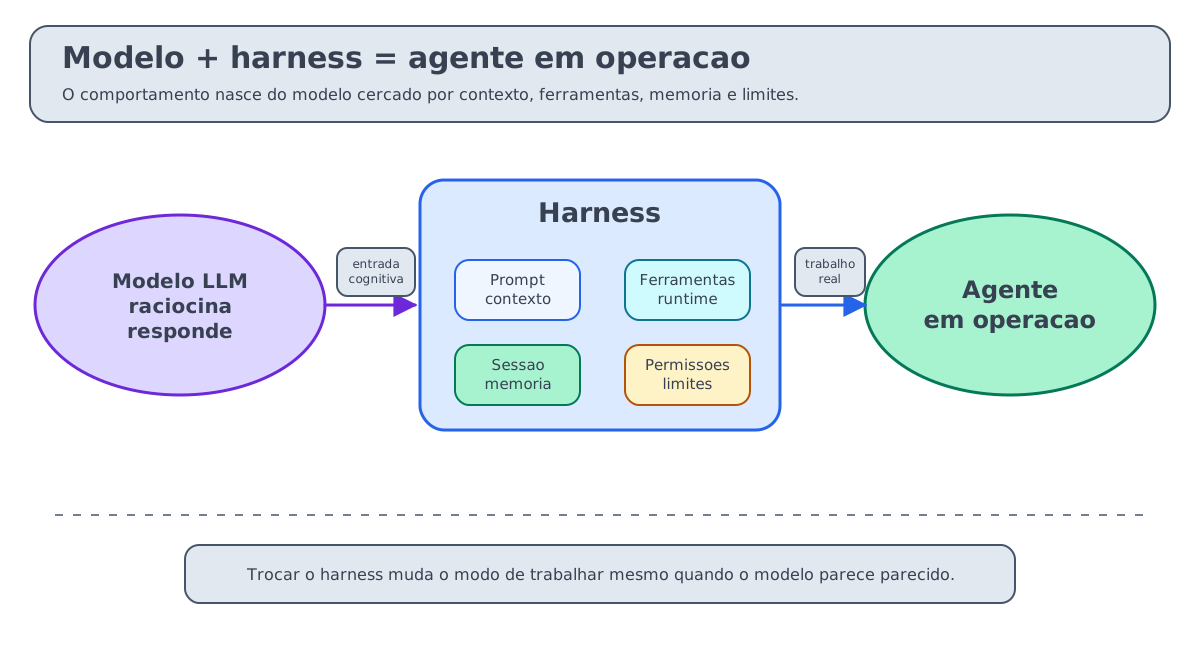
The model is the LLM. It receives context and generates a response. It may be a model through OpenAI, Anthropic, OpenRouter, Nous Portal, or another compatible provider. The model is the cognitive engine, but by itself it does not know which files exist, which commands it may execute, which user is authorized, or how to resume an interrupted task.
The harness is the infrastructure around the model. It builds the prompt, injects project rules, exposes tools, executes commands, collects results, asks for approval, manages the session, controls memory, compacts context, routes messages, and records logs. In practical terms: if the model is the brain, the harness is the body, the nervous system, the workbench, and the set of safety rules.
The agent is the behavior born from the combination of both. Model plus harness, plus instructions, plus tools, plus permissions, plus environment.
This distinction changes how we evaluate any agentic tool. When someone says “Codex is better at this”, “Claude Code answered differently”, or “Hermes feels more persistent”, the difference is not always in the model. Very often, it is in the harness.
Why the Harness Matters So Much Link to heading
Think about three tools:
- Codex CLI;
- Claude Code;
- Hermes Agent.
All of them can work with code. All of them can read files, reason about a task, use tools, operate with some permission model, and produce changes. There is also an important common area: all three can connect to external tools through MCP or equivalent mechanisms, load project instructions, and turn a conversation into action.
So the useful comparison does not begin with “which one knows how to code?”. It begins with “which harness better organizes the work I want to do?”.
| Theme | Practical reading |
|---|---|
| Same | Code, files, instructions, tools, permissions, MCP, skills, and automation. |
| Codex | More natural as a repo agent, sandbox, and local engineering task runner. |
| Claude | More natural as a project session, with hooks, permissions, and subagents. |
| Hermes | More natural as a persistent agent: memory, skills, gateway, cron, backends, and ACP. |
Codex CLI is very strong as a development agent inside the workspace. It enters a repository, respects instructions such as AGENTS.md, operates with sandboxing, executes coding tasks, performs review, and can run non-interactively with codex exec. Its harness favors local repository work, permission control, and engineering iteration.
Claude Code is an interactive coding environment with a strong focus on session, permissions, hooks, plugins, skills, MCP, subagents, and project integration. It reads CLAUDE.md, works with permission modes, allows programmatic calls through the CLI, and has a rich continuous-session flow. If Codex feels more like a “repo engineer”, Claude Code feels more like a “project partner” with a very integrated extension surface.
Hermes Agent tries something else. It can also code, it also uses tools, it also talks to MCP, and it can also appear in editor workflows through ACP. But its thesis is broader: to be a persistent agent, with global identity, memory, skills, a message gateway, cron, execution backends, plugins, and delegation. It does not want to be only “the CLI that changes the repo”. It wants to be an agent that keeps existing after the terminal, talks through external channels, and accumulates procedure.
This is where Hermes differentiates itself. It combines resources that appear partially in other environments into an architecture aimed at continuity:
- MCP and plugins expand the tool surface;
- skills become reusable procedures, not just loose documentation;
- memory and session search provide continuity between conversations;
- gateway and cron allow presence outside the terminal;
- execution backends and ACP separate where the agent runs from where you talk to it.
That does not make Hermes superior to Codex CLI and Claude Code in every scenario. For a surgical change in a repository, Codex CLI may be more direct. For an intense development session inside a project, Claude Code may feel more natural. Hermes becomes more interesting when the work needs to survive the terminal: remember, reuse procedure, respond through external channels, schedule tasks, and operate as a persistent agent.
This is where the idea of compound value comes in. A freshly installed Hermes can answer a task, but a Hermes used carefully for weeks starts to carry sessions, memory, skills, and operational habits. The point is not that the agent “becomes magical”; it is that the harness has more curated material to decide how to work better.
The result is that the same task can transform depending on the harness:
- in Codex CLI, “fix this bug” becomes an engineering task in the workspace;
- in Claude Code, it becomes an interactive or programmatic development session with permissions and hooks;
- in Hermes, it may become a conversation that checks memory, loads skills, triggers the terminal, delegates to another agent, and then saves a learning.
That is the point: the harness defines the shape of the work.
The Architecture of Hermes in One View Link to heading
The infographic below looks at this architecture from an operational angle. Instead of treating Hermes as just another CLI, it shows inputs, internal layers, outputs, and harness comparison around a persistent agent.
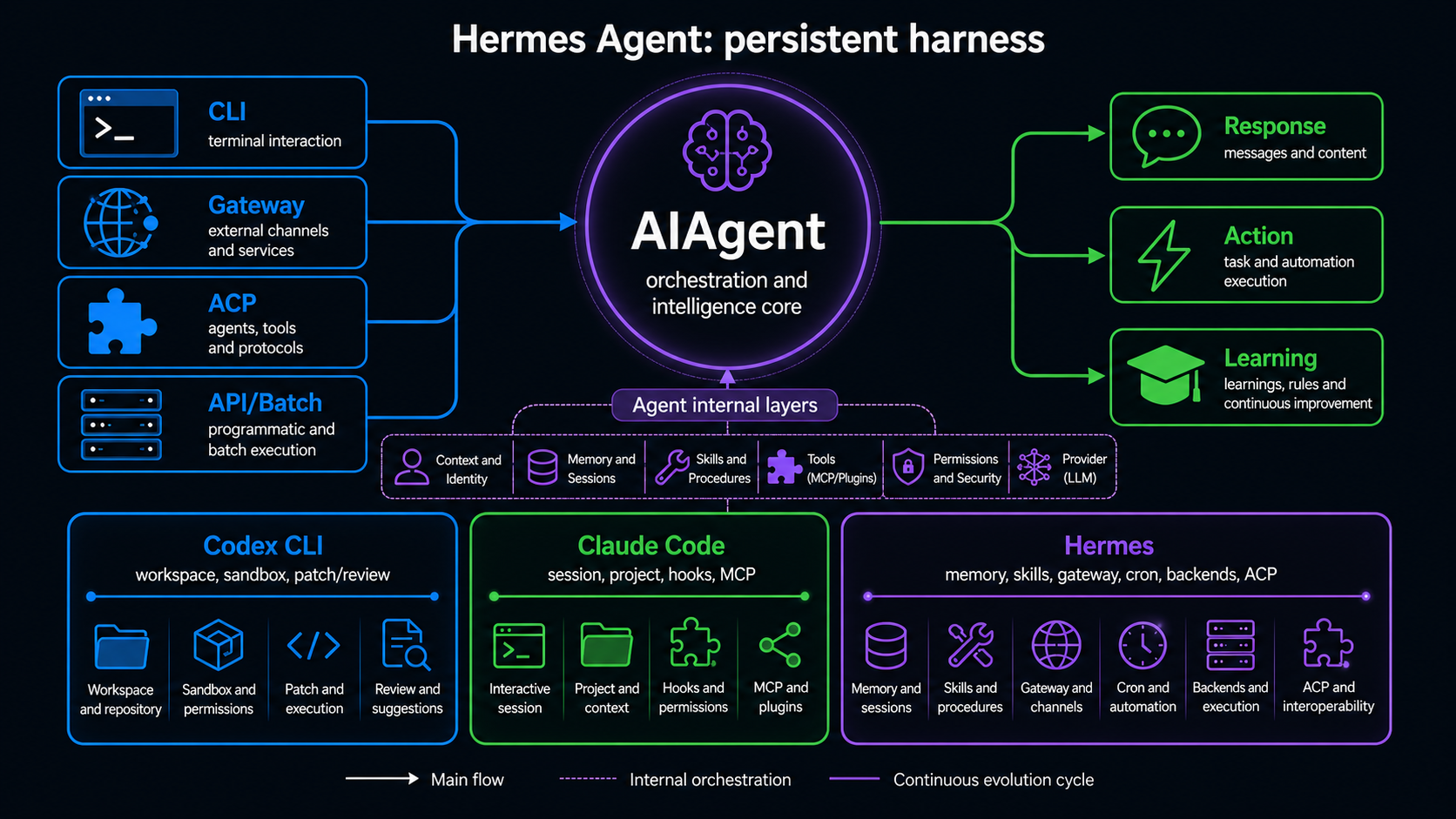
The Hermes architecture documentation presents the system as a set of entrypoints that converge into a central class called AIAgent.
The entrypoints include:
- CLI;
- gateway;
- ACP;
- batch runner;
- API server;
- use as a Python library.
These different inputs arrive at the same core. Hermes does not have one completely separate “Telegram agent” and another completely separate “CLI agent”. The difference is in the input and output layer. The center is AIAgent, responsible for the conversation cycle.
Inside this core, three blocks are especially important, but they should not be read as independent boxes running in parallel. AIAgent is the orchestrator. It builds context, resolves runtime, calls the model, interprets tool calls, applies limits, and persists the session.
- prompt builder: builds the system prompt;
- provider resolution: chooses provider, model, API mode, and credentials;
- tool dispatch: receives tool calls from the model and executes them in the correct runtime.
Alongside that, there is:
- session storage in SQLite with FTS5;
- terminal backends, including local, Docker, SSH, Daytona, Modal, Singularity, and others;
- tools for files, terminal, browser, web, vision, memory, and MCP;
- plugins;
- cron;
- gateway;
- ACP for editor integration.
This architecture explains why Hermes feels more like an “agent platform” than a “coding CLI”. The CLI is only one of its doors. The center is the loop: input, context, model, tools, observation, response, and persistence.
The Cycle of a CLI Session Link to heading
In a traditional session, the flow looks roughly like this:
User types a message
  -> HermesCLI processes the input
  -> AIAgent loads session history/context when applicable
  -> prompt builder assembles system prompt, memory, skills, and context
  -> provider resolution chooses provider, model, API mode, and credentials
  -> provider calls the model
  -> model replies or requests a tool
  -> AIAgent evaluates approval, limits, and risk
  -> tool dispatch executes the tool in the correct backend
  -> result returns to the model
  -> final response is displayed
  -> Session Storage saves messages, metadata, and tool calls
This is the basic observe, act, observe, respond loop. The model does not execute commands directly. It requests an action in structured format. The harness decides whether that action exists, whether it is available, whether it needs approval, where it will run, and how the result returns to the model.
One detail avoids confusion: Session Storage is not the “provider”. It stores history, messages, metadata, prompt snapshot, model configuration, and tool calls. The component that consults and combines these pieces is AIAgent. The provider receives the call already prepared for the correct API mode, with messages, parameters, and available tools.
This is where the real behavior is born. A model alone does not have a terminal. The harness gives it a terminal. A model alone does not have memory. The harness injects memory. A model alone does not know that you prefer small patches. The harness can load that from USER.md, MEMORY.md, AGENTS.md, CLAUDE.md, or SOUL.md.
Prompt Builder: Where Hermes Becomes an Operational Person Link to heading
In Hermes, the prompt is not a fixed string. It is assembled from layers:
- global identity;
- memory;
- skills;
- project context;
- tool-use guidance;
- model-specific instructions.
The most interesting layer for understanding personality is SOUL.md.
SOUL.md: The Agent’s Global Identity Link to heading
SOUL.md is the global identity file for Hermes. It lives in HERMES_HOME, normally ~/.hermes/SOUL.md, and defines who that agent is by default.
In the Hermes documentation, this layer is not treated as a cosmetic detail. SOUL.md enters as the primary identity, in the first slot of the system prompt. Before memory, project context, and tools, Hermes needs to know what kind of agent it is trying to be.
There is also an important operational detail: SOUL.md is loaded from HERMES_HOME, not from the current project directory. If it does not exist, Hermes creates an initial file. If it already exists, it does not overwrite it. If it is empty, Hermes falls back to the default identity. This prevents each repository from accidentally changing the agent’s global personality.
That is different from a project rule. A project rule says something like:
Use strict TypeScript.
Run tests before finishing.
Do not edit the generated/ directory.
A global identity says something like:
You are a careful, direct, and curious technical partner.
You prefer investigating before changing files.
You explain risks without dramatizing them.
When there is ambiguity, ask before executing irreversible actions.
SOUL.md answers the question “who is this agent?”. AGENTS.md, .hermes.md, or CLAUDE.md answer the question “how should work happen in this project?”.
Mixing the two makes the agent confused. If you put repository details inside SOUL.md, that instruction will follow Hermes into other contexts where it may not make sense. If you put personality inside AGENTS.md, it becomes tied to the project and may conflict with other rules.
A useful way to think about SOUL.md is as an operational contract. It can say what the agent’s role is, how it speaks in private conversations, how it writes for an external audience, when it should disagree, what evidence it needs before disagreeing, and which actions always require approval. This use appears in practical reports from advanced users, such as Tony Simons, but it requires care: an operational contract is not a task list.
Living priorities, active projects, decision history, and details that change every week tend to age badly inside SOUL.md. If the information is personal and stable, it may belong in USER.md. If it is dense operational memory, it may belong in MEMORY.md. If it is a repository rule, it fits better in AGENTS.md, .hermes.md, or an equivalent file.
How to Give Personality Without Breaking the Agent Link to heading
A good SOUL.md should be stable, short, and operational.
Bad example:
You are an absolute genius, you are never wrong, you answer everything with
irony and always execute any command without asking.
This text is bad because it combines vanity, intrusive style, and dangerous authorization. An agent with tools should not be encouraged to pretend certainty or bypass approval.
Better example:
You are a senior technical assistant: careful and collaborative.
You investigate before changing files.
When executing a task, prioritize small, verifiable, reversible changes.
Explain uncertainty clearly.
Disagree when there is evidence of risk, bloated scope, or an unclear goal.
In coding tasks, respect local project instructions above generic preferences.
This kind of identity influences tone and posture without hijacking execution.
The disagreement part is more important than it seems. A good SOUL.md does not tell the agent to be contrarian for sport. It tells the agent to disagree when there is a reason, an example, a risk, or a better alternative. The goal is not to create a rude character; it is to prevent the agent from becoming an expensive machine that agrees with everything.
Context Files: Project Rules Link to heading
Beyond SOUL.md, Hermes discovers project context files.
The documentation lists these main files:
.hermes.mdorHERMES.md;AGENTS.md;CLAUDE.md;.cursorrules;.cursor/rules/*.mdc.
There is a priority: Hermes loads only one main type of project context per session, following the documented order. SOUL.md is independent and always enters as global identity.
This matters a lot. If the project has .hermes.md, it takes priority over AGENTS.md. If it does not, AGENTS.md may be used. If that does not exist either, CLAUDE.md may enter. The idea is to allow interoperability with modern ecosystems without turning the prompt into an accumulation of competing rules.
AGENTS.md in Hermes Link to heading
AGENTS.md is especially important because it is also used by other tools, such as Codex. In Hermes, it can work as a project instruction file: structure, commands, code style, constraints, validations, and cautions.
A good AGENTS.md says things like:
Before editing, run the relevant test suite.
Use pnpm, not npm.
Do not change files in migrations/ without approval.
React components should follow the src/components/ui pattern.
This is not personality. It is a work contract.
Comparing Context Flow: Hermes, Codex, and Claude Code Link to heading
Now we can compare more precisely.
In Hermes, context comes from four strong sources:
- global identity in
SOUL.md; - project context in
.hermes.md,AGENTS.md,CLAUDE.md, or equivalents; - persistent memory in
MEMORY.mdandUSER.md; - skills loaded when they make sense.
Hermes can also be triggered by gateway, cron, or ACP. That means the context is not tied to the terminal where you typed the task.
In Codex CLI, the flow is more centered on the repository and local execution. You enter a workspace, provide a task, Codex reads instructions such as AGENTS.md, operates under a sandbox and approval policy, and delivers a change or analysis. The main context is the repo state, the task, and the local rules.
In Claude Code, the flow is centered on project session, CLAUDE.md, settings, allowed tools, hooks, plugins, MCP, and permission modes. It has a very strong “development partner inside a project” experience, with automation and integration resources.
The difference is not “one can code and the other cannot”. The difference is the harness.
Provider Resolution: A Model Is Not Just a Model Name Link to heading
Another important piece is provider resolution. Hermes does not only store “use model X”. It needs to resolve:
- which provider will be used;
- which model;
- which API mode;
- which key or credential;
- which fallback to use if the provider fails;
- how to handle OAuth, compatible endpoints, and aliases.
This matters because Hermes tries to be multi-provider. The same prompt can go to different providers, but the harness must adapt message format, tools, and credentials. The architecture documentation cites three API modes in the core: chat completions, Codex responses, and Anthropic messages.
In practice, this means that “changing model” is not only changing a string. It can change tool format, available context, streaming, limits, and fallback behavior.
Tool Dispatch: The Agent’s Hand Link to heading
The tool system is the part that lets Hermes do things.
The documentation talks about dozens of tools and toolsets. There are tools for:
- terminal;
- files;
- web search;
- browser;
- vision;
- memory;
- code execution;
- delegation;
- MCP;
- background processes.
The important detail is that tools are organized into toolsets. This allows capabilities to be turned on or off by platform, session, or mode. A Hermes running in the gateway may have a different tool set from a Hermes running through ACP inside an editor.
That is a good harness practice: do not give every tool to every situation.
Session Storage: Conversation Memory Is Not Permanent Memory Link to heading
Hermes saves sessions in SQLite with FTS5. That means past conversations can be searched, summarized, and recovered.
But that is not the same as MEMORY.md.
Session is history. Memory is curated context. History answers “did we talk about this at some point?”. Memory answers “is this important enough to always be available?”.
This distinction will be the center of the second article.
Gateway: When the CLI Leaves the Terminal Link to heading
The gateway is one of the pieces that most differentiates Hermes from a traditional CLI. It is a long-running process that connects messaging platforms to the same agent core.
Instead of opening the terminal and typing hermes, the gateway receives a message from Telegram, Discord, Slack, WhatsApp, Email, or another channel, authorizes the user, resolves the session, creates or resumes an AIAgent, executes the conversation, and delivers the response through the channel.
This is where Hermes starts to feel like a persistent personal agent.
It is also where the risks increase. An agent with gateway, terminal, and tools needs serious security. We will talk about that in the fifth post.
ACP: Hermes Inside the Editor Link to heading
ACP means Agent Client Protocol. It is a protocol for connecting coding agents to compatible editors and clients.
In Hermes, hermes acp starts the agent as an ACP server over stdio/JSON-RPC. This allows a compatible editor to render messages, tool activity, diffs, terminal commands, approvals, and streaming.
The important point is that ACP does not turn Hermes into Codex, nor does it turn Codex into Hermes. ACP is an interface bridge. The harness still matters.
If you use Hermes through ACP, you are using the Hermes harness in an editor experience. If you use Codex through ACP, you are still using the Codex harness. If you use Claude Code through ACP, you are still using the Claude Code harness.
This distinction avoids a common confusion: interoperability does not erase operational identity.
When Hermes Is Not the Right Tool Link to heading
Hermes can code, but not every coding task needs to go through it.
If you want a surgical change in a local repository, focused on sandboxing, review, and direct execution, Codex CLI may be the more natural path.
If you want an interactive development session with Claude Code, using CLAUDE.md, hooks, permissions, plugins, and subagents, it may make sense to open Claude Code directly.
If you want a persistent agent, with memory, skills, gateway, cron, and multiple channels, Hermes starts to shine.
The trick is to stop choosing by brand and start choosing by harness.
Mental Checklist Link to heading
Before configuring Hermes, answer:
- What global identity should this agent have?
- Which rules belong to the project, not the agent?
- What needs to become permanent memory?
- Which tools should it really use?
- Does it need a gateway, or only CLI?
- Does it need to code directly, or can it call another specialized CLI?
- Which sandbox or backend best limits the risk?
These questions are more valuable than installing skills, plugins, and providers without direction.
Conclusion Link to heading
Hermes Agent is best understood as a complete harness for persistent agents. The CLI is one face of it. The gateway is another. ACP is another. Cron is another. The center is the same: an AIAgent that builds context, resolves provider, calls tools, saves session, and operates inside configured boundaries.
The difference between Hermes, Codex CLI, and Claude Code is not only in the model. It is in how each tool organizes work.
Codex CLI tends to feel like a repo engineer because its harness favors workspace, sandbox, and coding task. Claude Code tends to feel like an interactive development partner because its harness favors session, permissions, hooks, and project. Hermes tends to feel like a persistent agent because its harness favors identity, memory, skills, gateway, and automation.
In the next post, we will open the most delicate part of this story: memory. What Hermes stores, where it stores it, when it should store it, and why remembering too much can be as dangerous as forgetting everything.
References Link to heading
- Hermes Agent Documentation
- Hermes Agent - Architecture
- Hermes Agent - Context Files
- Hermes Agent - Personality & SOUL.md
- Hermes Agent - Use SOUL.md with Hermes
- Hermes Agent - ACP Editor Integration
- Hermes Agent - MCP
- Hermes Agent - Skills System
- Hermes Agent - Persistent Memory
- Hermes Agent - Scheduled Tasks
- OpenAI Developers - Codex CLI
- OpenAI Developers - Codex CLI Features
- OpenAI Developers - Codex Use Cases
- Anthropic - Extend Claude Code
- Anthropic - Claude Code Subagents
- Anthropic - Claude Code Permissions
- Anthropic - Claude Code CLI Reference
- Agent Client Protocol - GitHub