Memory and context in Hermes: MEMORY.md, USER.md, providers, and Context Engine Link to heading

In the first article in this series, we treated Hermes Agent as a harness: the layer that turns a language model into an agent that can act, remember, use tools, respect permissions, and talk through different interfaces.
Now we enter the part that most changes the feeling of continuity: memory and context.
For someone who has never seen Hermes, the central idea is simple:
The model responds.
Hermes decides what the model receives before responding.
That difference looks small, but it is almost everything. Hermes assembles the prompt, injects instructions, loads files, searches old sessions, adds memory, exposes tools, and, when the conversation gets long, decides how to reduce or reorganize context.
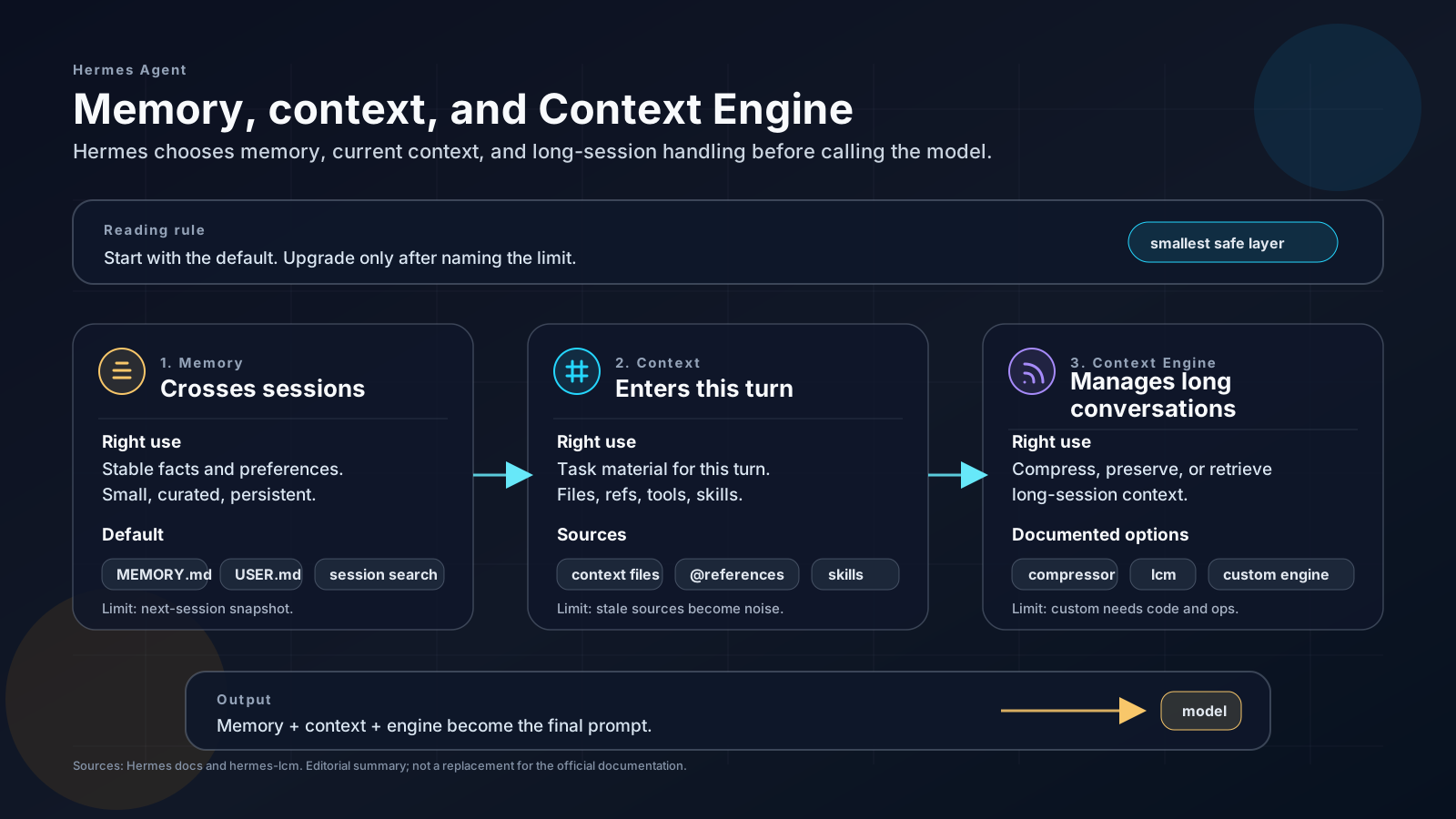
That is why this post is not about “saving everything”. It is about choosing the smallest continuity system that still solves the problem.
Memory answers:
What is worth keeping across sessions?
Context answers:
What should enter the prompt for this turn?
Used well, memory creates continuity. Used poorly, it becomes permanent noise. Well assembled context helps the model act precisely. Poorly assembled context throws old history, duplicated instructions, and irrelevant details into the prompt.
The healthy order is this: first understand the default, then the limits, then the extensions.
The recommended default: start simple Link to heading
The starting point in Hermes is not installing every provider. It is using the default.
A conservative default has these pieces:
| Piece | What it is for |
|---|---|
MEMORY.md |
short operational facts that should cross sessions |
USER.md |
stable user preferences |
| context files | identity, project rules, and conventions |
| context references | files, diffs, URLs, and images pointed to in the current turn |
| session search | searching old conversations when needed |
compressor |
default context engine for long conversations |
This already solves a lot.
You can open the files, read what is being injected, review a bad memory, and understand why the agent behaved a certain way. That auditability is a feature. The more automatic and external the memory system becomes, the more important it is to answer annoying questions: where the data lives, who can access it, how to delete it, how to audit it, and how to prevent an old memory from becoming certainty.
So the practical rule is:
stay with the default until you can name the limit you found.
If you still do not know which limit the default has reached, you probably do not need an external provider or an alternative context engine yet.
What memory is in Hermes Link to heading
Memory is what Hermes loads to create continuity between sessions. It should not be an archive of everything that happened. It should be a small collection of information that changes the agent’s behavior in future conversations.
In the official documentation, short persistent memory lives mainly in two files:
~/.hermes/memories/MEMORY.md
~/.hermes/memories/USER.md
MEMORY.md stores operational facts about environment, projects, conventions, and lessons learned. USER.md stores preferences and the user’s working style.
That separation matters.
A fact like:
This Hugo project uses npm run build:dev to validate drafts.
belongs in MEMORY.md.
A preference like:
The user prefers answers in pt-BR, with uncertainties made explicit.
belongs in USER.md.
A personal preference is not an environment fact. A technical fact is not a personality trait. Mixing everything makes the agent less predictable.
Why memory is small Link to heading
According to the current documentation, the default limits are small on purpose:
MEMORY.md: 2,200 characters, about 800 tokens;USER.md: 1,375 characters, about 500 tokens.
This may look too small. In practice, it is a defense.
Persistent memory enters the prompt at the beginning of the session. Everything you put there competes with instructions, project context, skills, history, and useful model space. Too much memory becomes a fixed tax on every conversation.
Hermes forces the right question:
does this really need to be always available?
If the answer is “maybe someday it will be useful”, it probably should not go in. If the answer is “this changes how the agent should behave in almost every session”, then yes.
How memory changes Link to heading
The agent manages memory with actions such as add, replace, and remove.
add: adds a new entry;replace: replaces an existing entry;remove: removes an entry that is no longer useful.
replace and remove use substring matching. You do not need to repeat the entire entry; you only need a short, unique excerpt.
Conceptual example:
Existing memory:
Project uses pnpm, Vitest, and a line length limit of 100 characters.

Replacement:
old_text = "line length limit of 100"
content = "Project uses pnpm, Vitest, and a line length limit of 120 characters."
This encourages surgical editing. Good memory does not grow indefinitely; it is pruned.
One easy detail to miss: memory is loaded as a snapshot at the beginning of the session. When the agent adds, replaces, or removes something during a conversation, the change is written to disk, but it does not automatically change the prompt for the current session. It only truly enters the next session.
That behavior prevents the agent from changing its own foundation in the middle of reasoning.
What to save in memory Link to heading
MEMORY.md should store dense operational facts.
Good examples:
Project Atlas is a Hugo site.
Final articles live in content/articles/**.
Editorial drafts live in docs/drafts/**.
In the LegacyERP project, old integration files
must preserve their original encoding until migration is validated.
For new technical articles:
draft: true, slug without accents, and between 2 and 4 tags.
These entries are specific, reusable, and hard to infer safely without previous context.
USER.md should store preferences and working style:
User prefers answers in pt-BR.
Separate direct conclusion, confirmed facts, and uncertainties.
User usually wants analysis based on real evidence
before changes in legacy code.
User prefers operational tasks to be carried through
to validation when the direction is already clear.
This guides posture, not technical knowledge about a repository.
In a public post, examples need to be sanitized. Avoid publishing client names, internal paths, real names of private repositories, operational rules specific to your environment, or any detail that helps someone reconstruct your work structure.
What not to save Link to heading
Bad memory feels useful in the moment, but charges interest later.
Avoid saving:
- trivial questions asked once;
- large log excerpts;
- whole code blocks;
- information that is easy to rediscover;
- temporary paths;
- decisions that only applied to one session;
- instructions already present in
AGENTS.md,CLAUDE.md,SOUL.md, or equivalent files; - secrets, tokens, keys, and sensitive private URLs.
Bad example:
User asked about Hermes.
That says nothing. It does not improve any future session.
Better example:
User is creating an advanced pt-BR series
about Hermes Agent.
Focus: architecture, memory, CLI, skills, gateway,
security, Docker, and ACP.
Even then, that entry should only exist if the series remains relevant after this session.
Session search: history is not memory Link to heading
Besides MEMORY.md and USER.md, Hermes stores sessions in ~/.hermes/state.db, with full-text search through FTS5.
This layer is for questions such as:
- “what did we decide about that project last week?”;
- “which command worked on that server?”;
- “in which session did that error appear?”;
- “have we talked about this provider before?”
The documentation calls this session_search. The agent can search past conversations and receive a summary generated by an auxiliary model.
This is different from memory.
| Resource | Best use |
|---|---|
MEMORY.md |
critical facts that should always be in context |
USER.md |
user preferences and profile |
| session search | recover details from old conversations on demand |
Memory is small and enters early. Session search is large, but it needs to be queried. This distinction prevents turning all history into a permanent rule.
For the user, this layer appears in commands such as:
hermes sessions list
The goal is to navigate previous sessions, resume conversations, and recover context when it really matters.
Memory security Link to heading
Memory is sensitive because it becomes part of the prompt. A malicious entry can try to instruct the agent to ignore future rules, leak secrets, or execute improper commands.
The Hermes documentation indicates that memory entries are scanned against prompt injection patterns, credential exfiltration, SSH backdoors, and invisible characters.
Even with scanning, the practical rule remains:
- do not save secrets;
- do not save instructions that weaken approval;
- do not save content copied from an untrusted source as if it were a rule;
- review generated memories after sensitive tasks.
Memory should increase continuity, not reduce security.
When default memory is not enough Link to heading
The default starts to show its limits when you need to remember more than what fits in short notes.
This happens when:
- there are many recurring projects;
- technical decisions appear again and again;
- code and architecture patterns cross sessions;
- session search finds useful things but requires too much effort;
- you need semantic memory, relationships, profiles, or structured retrieval.
That is where external memory providers enter.
The important point: an external provider is additive. It does not replace MEMORY.md, USER.md, and session search. It runs alongside them.
External memory providers Link to heading
Hermes lists external providers such as Honcho, OpenViking, Mem0, Hindsight, Holographic, RetainDB, ByteRover, and Supermemory.
They do not all serve the same purpose. Some are simple and local; others are cloud services; others try to model the user; others behave more like a context database or knowledge graph.
Memory models, from simple to complex Link to heading
- Curated short file:
MEMORY.mdandUSER.md. - Searchable history: session search.
- Simple local memory: Holographic.
- Local-first technical memory: ByteRover.
- Memory as a service: RetainDB, Mem0, Supermemory.
- User and relationship modeling: Honcho.
- Navigable context database: OpenViking.
- Relational memory with reflection: Hindsight.
The order is not a quality ranking. It is a scale of operational complexity.
Holographic Link to heading
Holographic is a local provider focused on simple and private memory. It makes sense when you want to experiment with persistent memory without starting with a cloud platform.
- Infrastructure/hardware: local; no documented GPU requirement.
- Pros: simple, private, and good for experimentation.
- Cons: smaller ecosystem and fewer advanced features.
- Use when: you want a lightweight local alternative before moving to a more complex provider.
ByteRover Link to heading
ByteRover is a provider aimed at local-first technical memory. It is interesting when the agent needs to remember development patterns, code decisions, and operational lessons across sessions.
- Infrastructure/hardware: local, with an additional CLI/provider.
- Pros: good for recurring development work and technical memory.
- Cons: adds an operational component and still requires curation.
- Use when: code and architecture decisions need to cross sessions with more structure than
MEMORY.md.
RetainDB Link to heading
RetainDB offers persistent memory as a service, with API integration.
- Infrastructure/hardware: cloud; locally requires Hermes and an API key.
- Pros: quick setup and less local operation.
- Cons: external dependency, cost, and the need to review retention and deletion.
- Use when: you want memory as a service and accept delegating infrastructure.
Mem0 Link to heading
Mem0 is an adaptive memory layer for LLM applications, with managed and open source versions.
- Infrastructure/hardware: cloud in managed mode; self-hosted requires a server, LLM provider, and storage according to the chosen architecture.
- Pros: mature ecosystem, clear API, and open source option.
- Cons: cloud adds external dependency; self-hosted adds operations.
- Use when: you want automatic fact extraction and semantic search without designing everything from scratch.
Supermemory Link to heading
Supermemory positions itself as memory and context infrastructure for agents, combining memory, content extraction, connectors, sync, and managed RAG.
- Infrastructure/hardware: cloud; locally requires Hermes, package, and API key.
- Pros: strong for document ingestion, connectors, and semantic memory.
- Cons: more platform than simple local file; requires cost and governance evaluation.
- Use when: memory and context need to include documents, connectors, and graphs beyond the Hermes conversation.
Honcho Link to heading
Honcho adds cross-session user modeling to Hermes. Instead of only remembering loose facts, it tries to build a more sophisticated representation of who the user is and how the agent interacts with them.
- Infrastructure/hardware: Honcho Cloud or self-hosted instance.
- Pros: strong in personalization, multi-agent scenarios, and user modeling.
- Cons: privacy-sensitive: the more the system models you, the more audit, deletion, and limits matter.
- Use when: you want a personal agent that learns communication patterns, preferences, and relationships.
OpenViking Link to heading
OpenViking is an open source context database for agents. It organizes memory, resources, and skills with hierarchical navigation and layered loading.
- Infrastructure/hardware: self-hosted; requires installing and operating a server.
- Pros: good for structured knowledge, navigation, and large contexts with progressive loading.
- Cons: requires thinking in hierarchy and operating another component.
- Use when: you want a navigable context database, local or self-hosted, with explicit structure.
Hindsight Link to heading
Hindsight adds long-term memory with a memory database, entities, relationships, multi-strategy recall, and reflect, a synthesis over retrieved memories.
- Infrastructure/hardware: cloud or local; locally, it can use an embedded server with PostgreSQL and an LLM for extraction/synthesis.
- Pros: strong for relational knowledge, entities, and synthesis across memories.
- Cons: conceptually and operationally heavier.
- Use when: you need to retrieve facts, relationships, history, and conclusions across many sessions.
What context is in Hermes Link to heading
If memory is what crosses sessions, context is the package the model receives now.
Before the model answers, Hermes assembles a prompt with several layers. The prompt assembly documentation describes an approximate order that includes identity, tools, context from an external provider, system message, MEMORY.md, USER.md, skills, context files, and session metadata.
This explains why context is so important. The model does not simply “know” what happened. The harness decides what enters the call.
In Hermes, there are context sources and context engines.
Context sources are places from which Hermes pulls material: prompt, files, references, session, skills, tools, and memory.
Context engine is the strategy selected by context.engine to handle the conversation when it grows too large. The default is compressor.
So the expression “context provider” needs care. In Hermes, the more precise name is context engine plugin. The rest are context sources.
Context sources, from simple to complex Link to heading
Explicit prompt Link to heading
This is the simplest context: you write the information directly in the question.
- Infrastructure/hardware: no requirement beyond the model being used.
- Pros: explicit, auditable, and easy to correct.
- Cons: does not reuse knowledge and can become too long.
- Use when: the task is punctual and the context fits in a few lines.
Context files Link to heading
Context files store stable instructions that travel with the agent. This includes identity, project rules, operational preferences, and local conventions.
Typical examples:
SOUL.md
AGENTS.md
.hermes.md
CLAUDE.md
- Infrastructure/hardware: local filesystem.
- Pros: local, auditable, versionable, and easy to review.
- Cons: if they grow too much, they become always-present noise.
- Use when: the information should guide many sessions and can be read by humans.
Context references Link to heading
Context references point to specific material for the current turn: file, folder, diff, URL, image, or another resource.
- Infrastructure/hardware: depends on the reference; local files are cheap, URLs depend on network, images consume more context.
- Pros: on demand, explicit, and better than saving everything in memory.
- Cons: depends on pointing to the right source at the right moment.
- Use when: the task depends on a concrete artifact, such as a file, diff, page, or screenshot.
Skills Link to heading
Skills are packages of instructions, scripts, and workflows. They are not memory, but they work as procedural context: they teach the agent how to act in a domain.
- Infrastructure/hardware: usually local; may depend on CLIs, scripts, or APIs.
- Pros: standardizes recurring tasks and reduces manual prompting.
- Cons: a bad skill injects a bad process; too many skills can compete with the task.
- Use when: there is a repeatable workflow, such as reviewing a post, validating a deploy, or analyzing a type of code.
Toolsets, tools, and MCP Link to heading
Toolsets are groups of tools. They connect the agent to the real environment: terminal, files, web, browser, memory, code execution, MCP, and integrations.
- Infrastructure/hardware: varies by tool; terminal and files are local, web/MCP depend on network and credentials.
- Pros: fresh, verifiable context connected to the real system state.
- Cons: increases the risk surface.
- Use when: the answer needs to be based on the current system state, not only on memory.
Memory as a context source Link to heading
MEMORY.md, USER.md, and external providers also feed context. They bring facts, preferences, or retrieved memories into the model call.
- Infrastructure/hardware: depends on the source: local file, database, cloud, API, CLI, or auxiliary LLM.
- Pros: cross-session continuity.
- Cons: risk of retrieving something wrong or stale.
- Use when: the agent needs continuity beyond the current turn.
Context engines: compressor, LCM, and custom Link to heading
Sources say what can enter context. The context engine decides how to deal with the context window when the conversation grows.
compressor
Link to heading
compressor is the default Hermes context engine. It uses lossy summarization to reduce messages when the conversation approaches the token limit. According to the context compression and caching documentation, it works together with session hygiene in the gateway.
- Infrastructure/hardware: built into Hermes; depends on the model used to generate summaries when needed.
- Pros: ready by default, predictable, and enough for most long conversations.
- Cons: because it is lossy summarization, it can erase nuance, tool details, or older decisions.
- Use when: you want the default behavior, simple and sufficient for normal long sessions.
lcm
Link to heading
lcm appears in the documentation as an example context engine plugin for Lossless Context Management. The idea is to preserve knowledge in a more searchable structure, instead of depending only on lossy summarization.
On GitHub, hermes-lcm
is the most concrete experimental case I found. It uses SQLite, organizes context into a DAG of summaries, and exposes tools such as lcm_grep, lcm_describe, and lcm_expand. To use it, the configuration follows this idea:
plugins:
  enabled:
    - hermes-lcm

context:
  engine: lcm
- Infrastructure/hardware: installed plugin, local storage, and additional processing depending on implementation.
- Pros: better for long continuity, structured retrieval, and reducing conceptual loss.
- Cons: more complex, experimental, and needs observation to avoid creating a false sense of perfect memory.
- Use when: the conversation gets long, history matters, and simple summaries start losing relevant decisions.
Custom context engine Link to heading
The context engine plugin documentation allows creating a custom engine by implementing the ContextEngine interface. It needs to decide when to compress, how to compress, track tokens, and return a valid message list.
This is powerful, but it is another category of work. You stop merely configuring Hermes and start operating your own software.
- Infrastructure/hardware: depends on the implementation: it may use a local database, embeddings, graph, cache, or auxiliary LLM.
- Pros: adapts context management to the real domain of the agent.
- Cons: requires code, tests, operations, and a clear privacy and retention policy.
- Use when: the context problem is too specific for
compressororlcm.
In the current research, I did not find another ready context engine mature enough to list as a main option. What exists is the architecture for creating engines and hermes-lcm as a practical experiment. There are also GitHub discussions about pluggable engines and documentation for installing third-party engines, which reinforces that this ecosystem is still being born.
How to decide: memory or context? Link to heading
When something feels “missing” in the agent, first identify the type of absence.
Memory matrix Link to heading
Use this matrix when the problem is continuity between sessions.
MEMORY.mdandUSER.md: use when simplicity, auditability, and low risk are enough. They solve short facts and preferences in the prompt. The cost is manual curation.- Session search: use when you need to recover an old conversation on demand. It avoids turning the whole history into permanent memory. The cost is depending on the right search.
- ByteRover: use when technical patterns and code decisions need to cross sessions. It solves more structured local-first technical memory. The cost is operating an additional provider and maintaining curation.
- Holographic: use when the priority is local, lightweight, experimental memory. It solves richer local search without mandatory cloud. The cost is a smaller ecosystem and fewer advanced features.
- Other memory providers: use when you need a profile, collaboration, or a specific backend. They solve more specialized cross-session continuity. The cost is privacy, financial cost, and governance.
Context matrix Link to heading
Use this matrix when the problem is assembling, preserving, or reducing the context of the current turn.
- Context files: use when project rules, identity, and conventions are stable. They avoid repeating instructions in every prompt. The cost is becoming noise if they grow too much.
- Context references: use when the task depends on a specific file, diff, URL, or image. They inject precise context into the current turn. The cost is pointing to the right source.
- Skills, toolsets, and MCP: use when the agent needs process or observation of the real environment. They turn context into verifiable action. The cost is a larger operational surface.
compressor: use when an ordinary long conversation needs to fit in the context window. It reduces tokens automatically. The cost is that lossy summarization can erase nuance.lcm: use when the problem is loss of context in long conversations. It preserves context more richly than a simple summary. The cost is plugin, diagnosis, and complexity.- Custom context engine: use when there is a domain requirement that
compressorandlcmdo not cover. It solves a custom compression and retrieval strategy. The cost is code, tests, and governance.
The common mistake is trying to solve a context problem with permanent memory. If the task needs a specific file, use a context reference. If it needs a stable project rule, use a context file. If it needs to remember a preference, use USER.md. If it needs to recover an old decision, use session search. If that becomes recurring and semantic, then consider a provider.
Practical recipe Link to heading
I would use this pattern:
- Start with context files for identity, project rules, and conventions.
- Use
USER.mdfor personal preferences and working style. - Use
MEMORY.mdfor dense operational facts. - Use context references for concrete artifacts in the current task.
- Use session search to recover old history on demand.
- Keep
compressorwhile ordinary long conversations are good enough. - Add a memory provider when the limit is continuity between sessions.
- Consider
lcmwhen the limit is loss of context in long conversations. - Consider a custom context engine only when there is a domain requirement that justifies operating your own software.
This order avoids using memory as a universal drawer and avoids installing a provider out of curiosity.
Final checklist Link to heading
Before adding memory, provider, or engine, ask:
- Is this memory or context for the current turn?
- Will this be useful across several sessions?
- Is the information specific enough?
- Is it safe to inject this into the prompt?
- Does it already exist in a context file?
- Could it be recovered through session search instead of becoming memory?
- Is the problem context loss in a long conversation?
- Did
compressorreally fail, or did I just point to poor context? - Who will review, delete, or correct old memories?
- Are sensitive data involved?
If the answer is not clear, stay with the default. It is less glamorous, but easier to understand, audit, and fix.
Conclusion Link to heading
Memory and context are what make Hermes feel continuous.
MEMORY.md and USER.md store what should accompany the agent across sessions. Session search recovers the past when needed. Memory providers increase depth when short memory is not enough. Files, references, skills, and tools assemble the context of the current turn. compressor handles ordinary long conversations. lcm and custom engines enter when the problem stops being “remembering” and becomes “preserving context without losing structure”.
The golden rule is simple:
use the smallest layer that solves the problem safely.
In the next post, we will use this foundation to talk about profiles: how to create multiple agents in Hermes, each with its own HERMES_HOME, identity, memory, sessions, and gateway.
References Link to heading
- Hermes Agent - Persistent Memory
- Hermes Agent - Memory Providers
- Hermes Agent - Context Files
- Hermes Agent - Context References
- Hermes Agent - Skills
- Hermes Agent - Tools
- Hermes Agent - Plugins
- Hermes Agent - Architecture
- Hermes Agent - Prompt Assembly
- Hermes Agent - Context Compression and Caching
- Hermes Agent - Context Engine Plugin
- Hermes Agent - CLI Commands Reference
- hermes-lcm - Lossless Context Management for Hermes
- Hermes Agent Issue #5701 - Plugin context engine POC
- Hermes Agent Issue #10805 - Third-party context engine documentation
- Honcho - Hermes Agent + Honcho
- OpenViking - Documentation
- Mem0 - Open Source Overview
- Hindsight - Hermes Agent Persistent Memory
- RetainDB - Persistent Memory for AI Agents
- ByteRover - Documentation
- Supermemory - Overview